May 1, 2026
Developers shouldn't implement UIs: Rive
Aloïs Deniel

Something has always bothered me about the way teams build user interfaces.
By the time a feature ships, the developer has usually spent most of their time interpreting what somebody else already designed. Frame by frame, a mock-up is translated into a different paradigm. And once that translation is done, the same developer is expected to invent everything the mock-up didn't say: how things move, how they respond to input, how they degrade on a small screen, how they recover from an error. That second job is rarely budgeted, often rushed, and—let's be honest—rarely the part the developer is excited about. Most backend-leaning engineers I know would happily skip it. Most frontend ones I know would happily own it but never get the time.
The result is predictable: the polish that defines the user's actual experience ends up being whatever survives the last week before release.
My argument here is that this is structural, not personal—and that the way out probably isn't asking developers to care more.
Where the work actually goes
Let's look at how the responsibilities split today.
What the designer hands over
A modern Figma file is a tree of nested frames with a few thin layers of structure on top: variables for tokens, components and variants for reuse, a sprinkle of interactive prototypes for stakeholder demos. It's an excellent description of what the screen looks like in a handful of canonical states.
What it isn't is a description of how the screen behaves.
What the developer rebuilds
The developer takes that tree and reconstructs it inside an entirely different framework—Flutter, SwiftUI, Jetpack Compose, React, whichever applies. None of those frameworks model UI the same way Figma does, so very little ports literally. A box in Figma might end up as a Container, a DecoratedBox, a Material, or a custom widget, depending on what it eventually has to do.
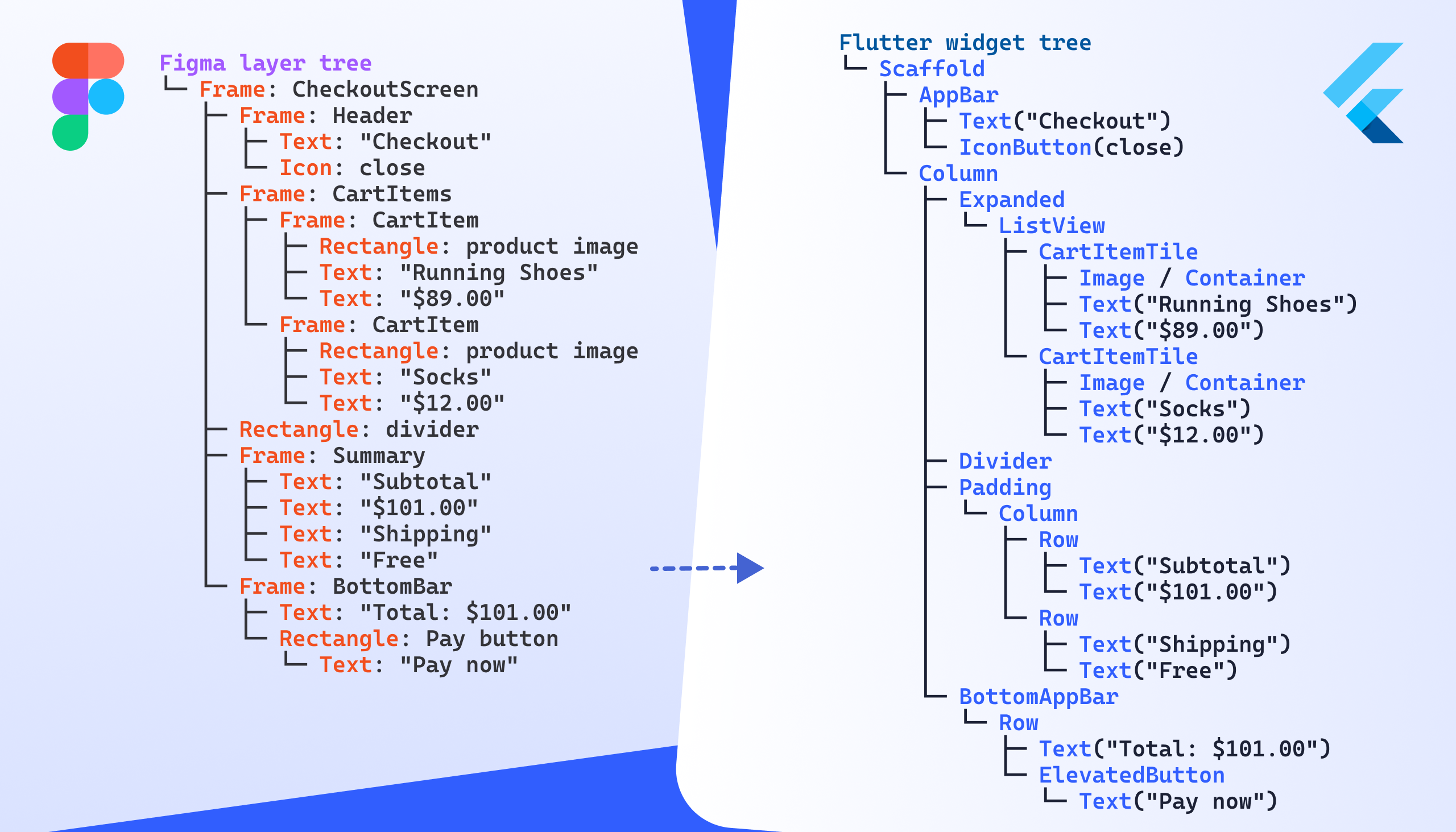
The text input is the canonical example. In Figma it's a frame with a text node inside, indistinguishable from any other container. In code it's an Input component with type, validation, focus state, placeholder, autocomplete, IME behavior, accessibility role, overflow rules—none of which appear anywhere in the design file. The developer invents those choices, often alone, often in the five minutes between two other tickets.
There's also a whole category of mismatches that nobody catches because they look fine. Text wraps slightly differently between Figma and Flutter. Gradients ease differently. Vector strokes anti-alias differently. Shadow composition isn't quite the same. The result is pixel-equivalent on the canvas and subtly off on device. Most developers won't notice—they're reasoning about state, not about kerning.
To put it bluntly: the developer is reverse-engineering 80% of the designer's work into a different language, and freestyling the missing 20%.

This isn't a designer-shaming argument
It would be fair to read the section above as "designers should just deliver more." That's not quite what I mean.
The scope of design has been quietly expanding for years. The Sketch files of a decade ago look nothing like a modern Figma file with auto-layout, variables, components, variants, and live tokens. Designers are already doing far more structured work than they used to, and the tooling has met them there. The honest question is whether the next step—owning the behavioral surface of the UI—is really out of reach, or whether the tooling just hasn't caught up to it.
I don't think designers need to write code. I think they need tools that let them express the things developers are currently inventing on their behalf.

So what would that actually look like?
Two paths come up.
Path one: designers learn to code

The most direct answer is to bring designers into the developer's environment. Component sandboxes like Storybook or Widgetbook exist precisely for this: the designer authors the visual component, the developer wires it to data, everyone keeps their lane.
With AI assistance, this is more approachable than it would have been five years ago. But it's still a mindset switch, not just a syntax one. And I'm not convinced that asking a single role to fluently context-switch between visual judgment and engineering rigor produces the best version of either. The designer should remain the owner of how the UI feels. Forcing them through a code editor every time they want to adjust that feeling adds friction in exactly the place we should be removing it.
Path two: a more capable design tool

The other path is to question the assumption that the design tool needs to stop at static visuals.
This is where I keep coming back to Rive. Most people know Rive as the animation tool—the one Duolingo uses for its mascot, the one motion designers reach for when they want their work to actually run on a phone. That framing undersells it.
Over the last few years Rive has quietly grown into something closer to a behavioral design tool: state machines, data binding, components, layout primitives, text, and more recently scripting. It still does motion, but motion is now one feature among many. The mental model isn't "make a picture and animate it" anymore—it's "describe how this thing behaves, visually and over time, end to end."
There's also a runtime advantage that's easy to miss. A Rive file is a real artifact you can ship and load dynamically. A layout change doesn't necessarily need a release. An A/B test on a visual treatment doesn't need a developer in the loop. A tweak to a transition curve doesn't need a code review. For experimentation, that changes the economics.
A small example
To make this less abstract, the simplest possible case is worth walking through: a card with a title, a body, and a state. Nothing exotic. The point is to show that the same layout you'd build in Figma is buildable in Rive with the same primitives—and once it's there, the upgrade to motion and state is essentially free.
In Rive
Here's what the same card looks like inside the Rive editor:
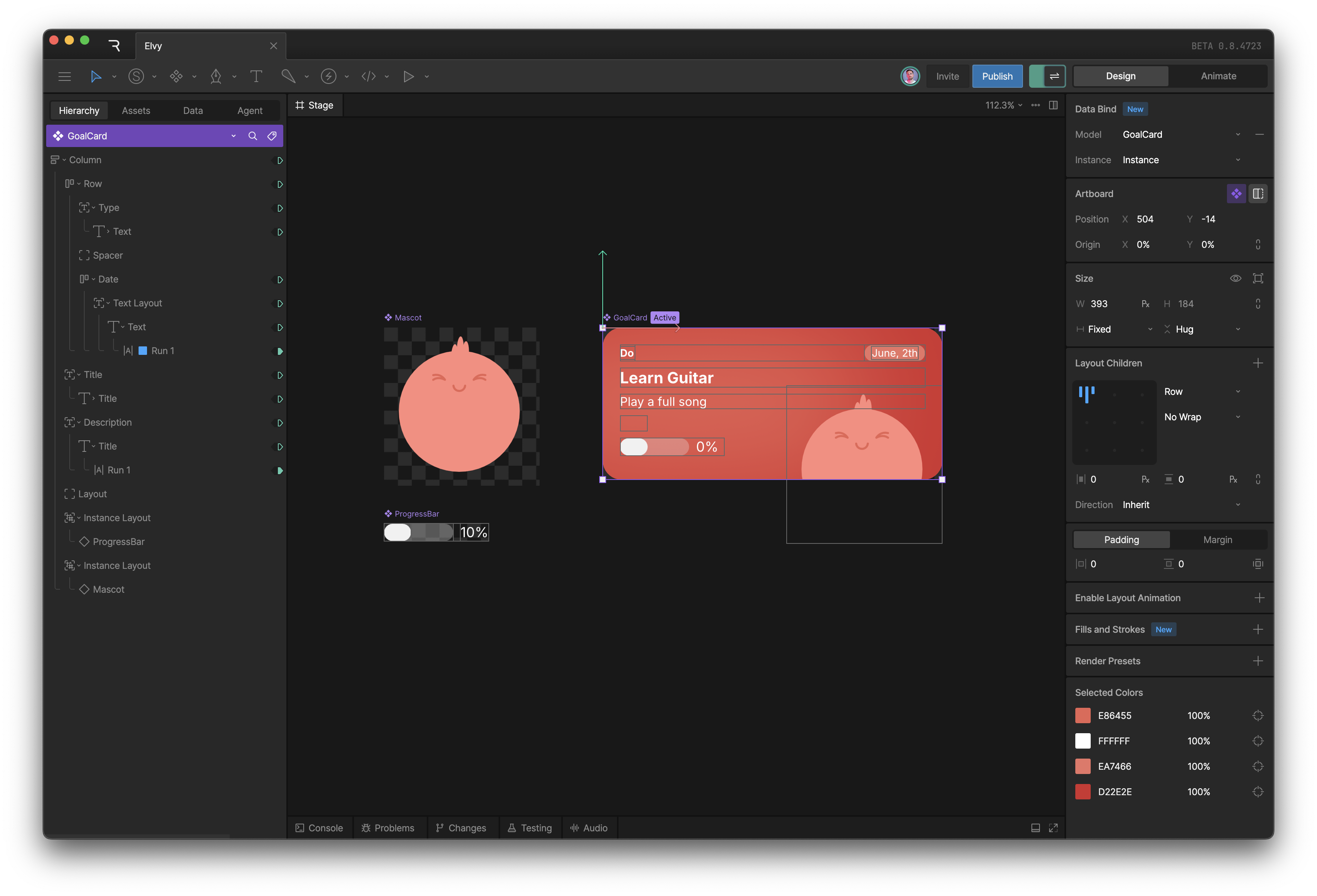
If you've spent any time in Figma, the layout of this screen will feel immediately familiar. The node tree lives on the left. The properties of the selected node live on the right. The card itself is a container that behaves a lot like a Figma auto-layout. The title and body are plain text nodes. GoalCard is a component, with all the instance and override semantics you'd expect.
That's the part that won me over. The editor is dense, capable, and clearly well past the prototype phase—but the vocabulary it uses is the one I already speak. The learning curve was much gentler than I had braced for. You do have to think slightly differently in a few places, because Rive lets you go further than Figma does, but it's never disorienting.
Reproducing the layout itself is the easy part. The interesting stuff—the part that makes the switch worth it—starts when you bring in data binding and state machines.
Data binding
Data binding is the first piece. You describe the shape of the state your component cares about directly inside Rive, the same way you'd define a view model in code, except it's visual:
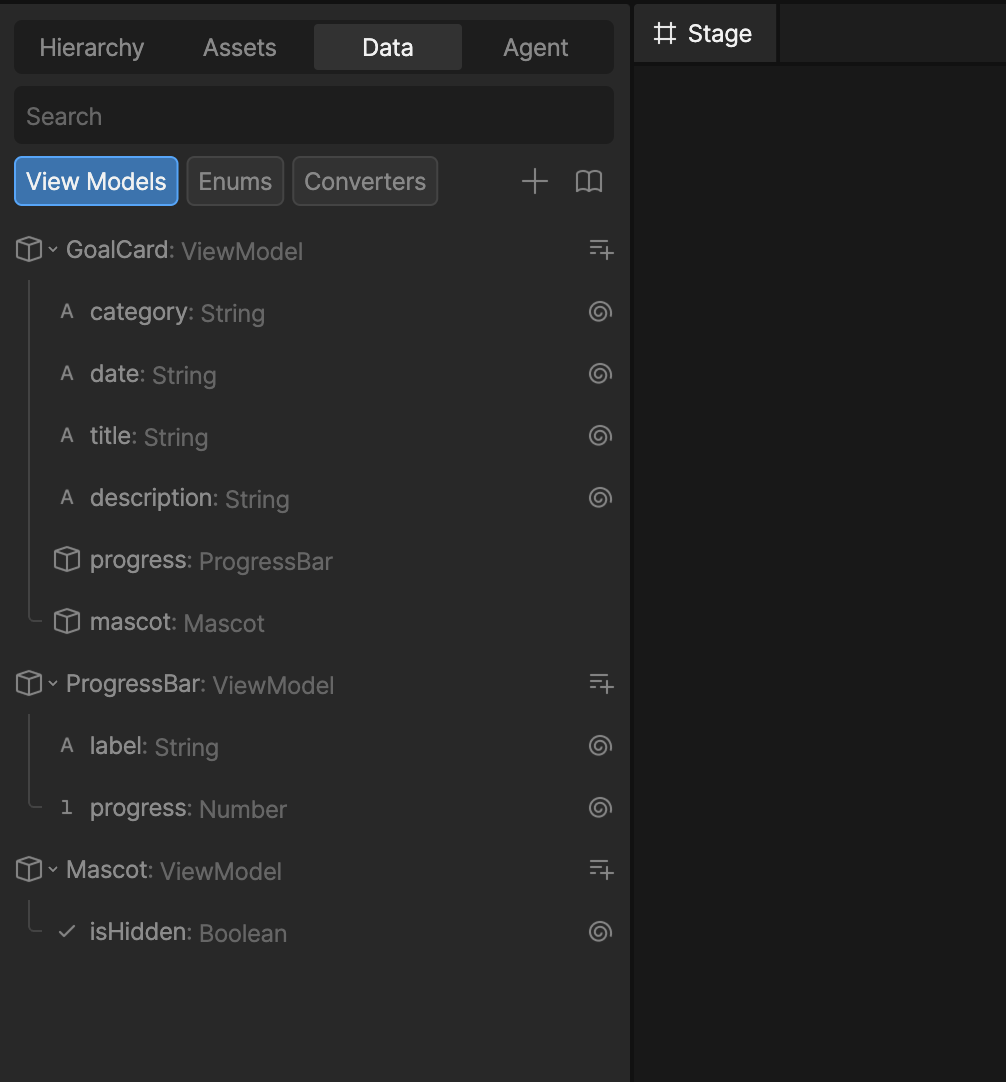
Once that shape exists, you wire its properties to the visual properties of the component. The progress value drives the width of the progress bar. The title string drives the text node. And so on:
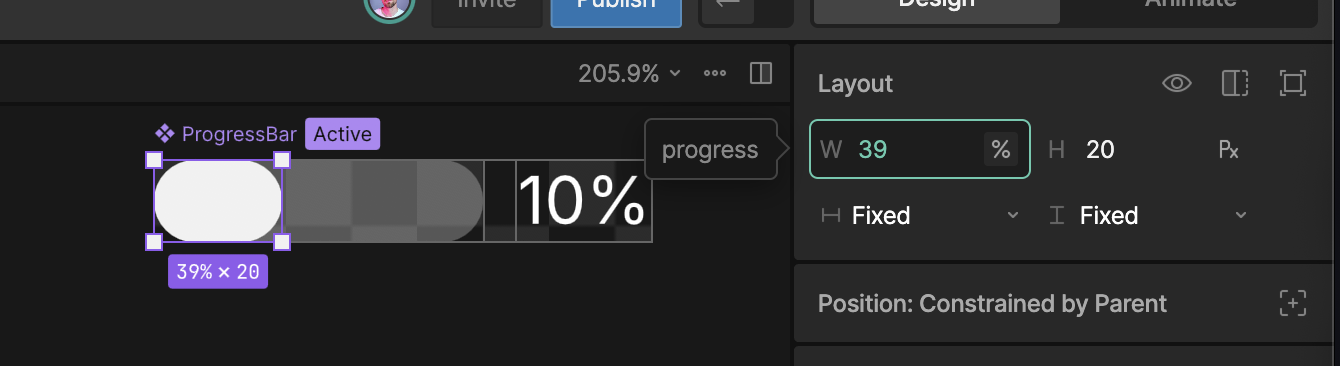
This will look familiar to anyone who's built UIs before—it's the same idea as preparing a view model, except the wiring is part of the design artifact instead of something the developer reconstructs after the fact. Figma's component properties hint at this idea but stop well short of a real data layer. Rive doesn't.
State machines
State machines are where the comparison with Figma stops being a comparison.
A Rive state machine is a visual definition of how a component reacts: which states exist, what triggers a transition between them, what plays out in between. The conditions can read directly from the view model, so the same data layer that drives the visuals also drives the behavior. None of it requires code.
A concrete case: I want the mascot to hide and show with a little animation when the user taps the card.
Doing this in Figma means stacking prototype tricks until you have something approximate. It won't match a real motion-design tool, the developer will end up reimplementing it from scratch anyway, and any animation that survives will probably be authored in yet another tool. In Rive, you have a real keyframe-based timeline:
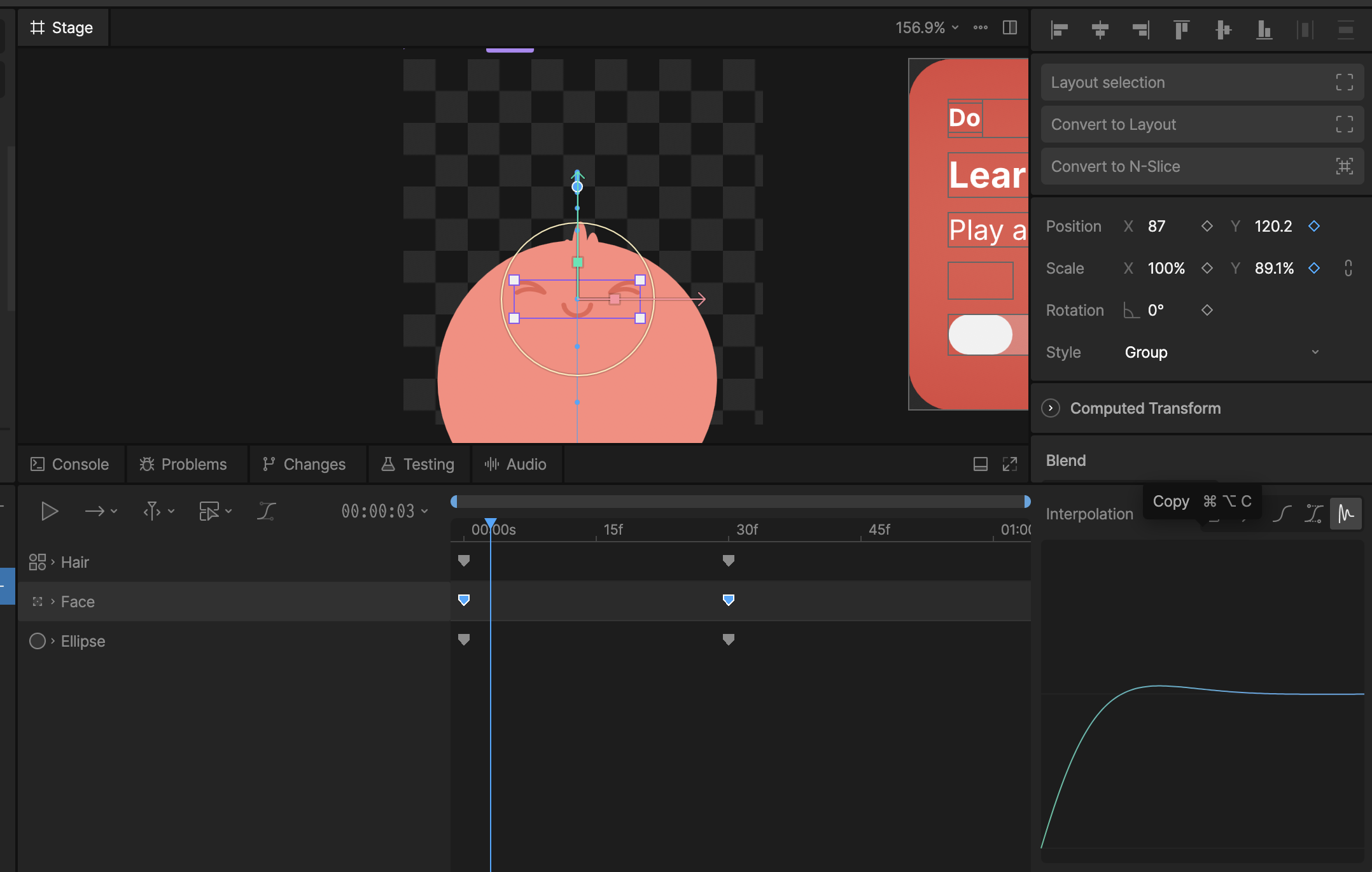
The transitions between states are then wired up in the state machine panel, with conditions that reference the view model. isHidden flips, the transition fires, the keyframes play. It looks more involved than it is. The hard part is the creative judgment—and that's where designers should be spending their time in the first place.
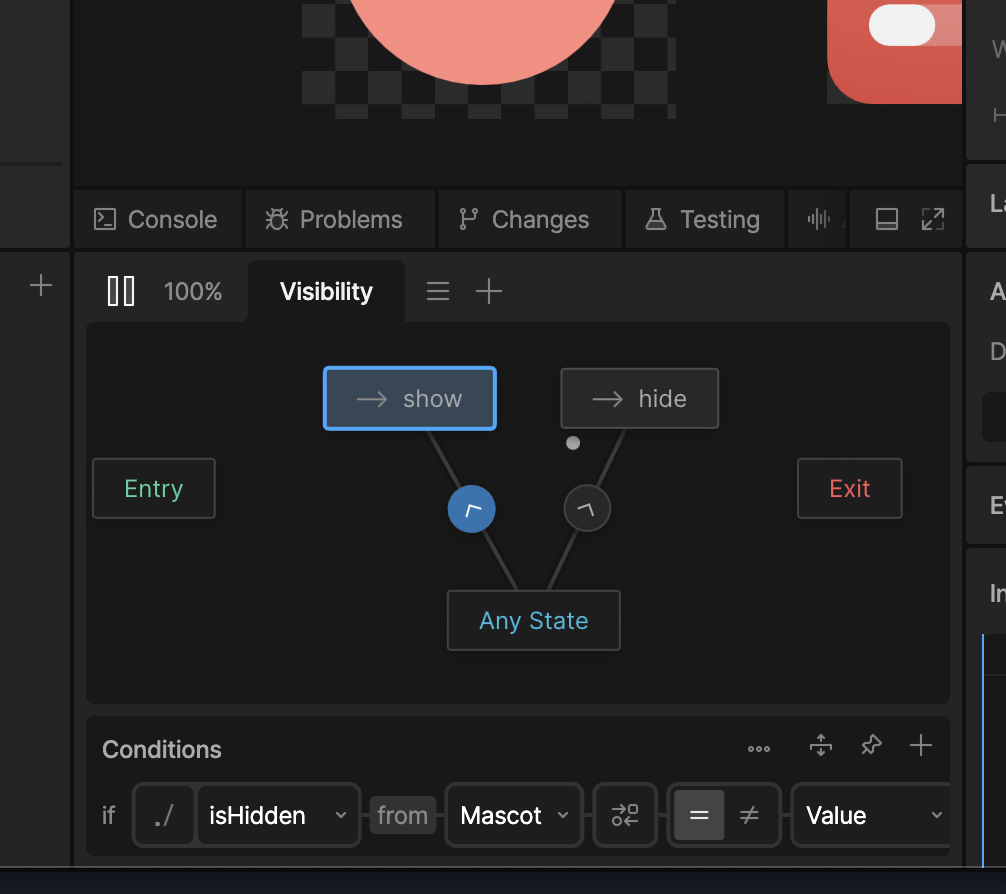
This example only scratches the surface. State machines can react to things like the component's own size, which is how you start expressing responsive layout natively rather than as a special case bolted on later.
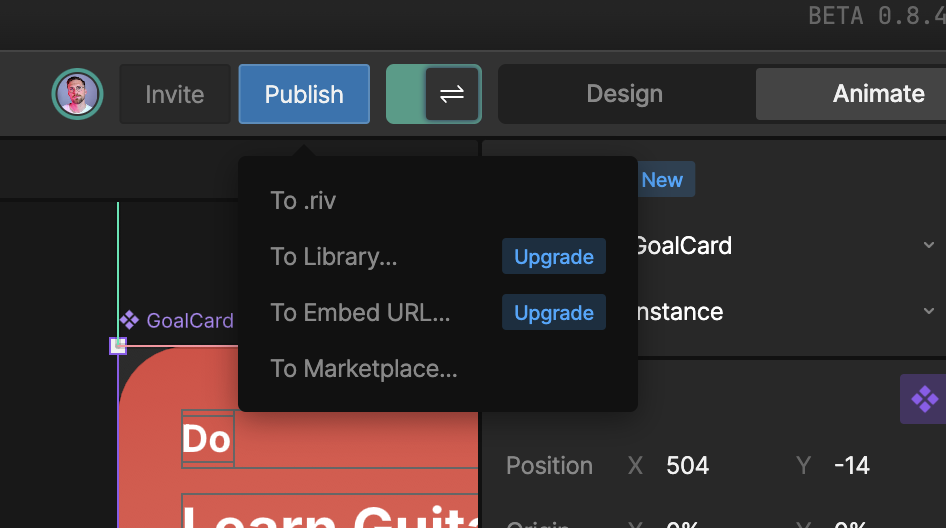
When the component is ready, you export it as a .riv file and drop it into your app's assets like any other resource:
Integration in a Flutter app
Bringing the component into a Flutter app is straightforward: add the rive package, register the .riv file as an asset, and drop a RiveWidgetBuilder into the tree.
late final fileLoader = FileLoader.fromAsset(
  "assets/goal_card.riv",
  riveFactory: Factory.rive,
);

@override
Widget build(BuildContext context) {
    return RiveWidgetBuilder(
      fileLoader: fileLoader,
      artboardSelector: ArtboardSelector.byName('GoalCard'),
      onLoaded: (state) {
        // ...
      },
      builder: (context, state) => switch (state) {
        // ...
        RiveLoaded() => RiveWidget(controller: state.controller, fit: .layout),
      },
    );
}
The interesting part happens in onLoaded. You instantiate the view model the designer defined inside Rive, grab references to whichever properties the app needs to read or write, and bind the instance to the controller:
onLoaded: (state) {
    final cardVm = state.file.viewModelByName("GoalCard")!;
    final viewModel = cardVm.createInstance()!;

    _title = viewModel.string('title')!;
    _progress = viewModel.viewModel('progress')!.number('progress')!;
    _isMascotHidden = viewModel.viewModel('mascot')!.boolean('isHidden')!;

    state.controller.dataBind(DataBind.byInstance(viewModel));
}

// elsewhere in the app
onTap: () => _isMascotHidden.value = !_isMascotHidden.value,
That's the entire contract between the design and the app. Mutate a property on the view model, and the visuals and the state machine react accordingly. Tap the card, the mascot hides—the animation, the transition, the layout adjustments all live inside the .riv, not inside Flutter.
What I find compelling about this is what the developer is not doing. Not laying out the card. Not authoring the animation curve. Not wiring up an AnimationController. Not maintaining a parallel mental model of what the design "should" look like. The component on screen is the same artifact the designer authored, animated the way they animated it, behaving the way they specified. The developer's job becomes the part that should have been the developer's job all along: deciding what data to feed in, and what to do with the events that come out.
The binding code itself is admittedly one-time boilerplate per component—but the pattern is repetitive enough to template, and a reasonable target for code generation as the workflow matures.
The on-ramp from Figma is short
For anyone fluent in modern Figma, Rive feels less foreign than expected. The layout primitives behave similarly. Components and instances exist. Properties work the way you'd guess.
The biggest conceptual difference is that Figma's variables and component properties are replaced by view models. It's a slightly bigger idea, but it's also strictly more flexible—and it pays off the moment your component has more than one state worth distinguishing.
Conclusion
The thing I keep coming back to is single source of truth. When the visual definition of the UI lives in one place—and that place can also describe behavior, state, and motion—then a visual change is a change to the source, not a change request to a developer. The developer's job becomes what it should have been all along: connecting the UI to the actual logic of the app.

Figma will probably keep being the right tool for early exploration. It's fast, it's social, it's where stakeholders are comfortable. But for the part of the process where design becomes the real input to a real product, I think we've outgrown it. Rive points at where this is heading, and I suspect the next decade of UI design tooling will look a lot more like that than like a faster Figma.